• Contact Us
  • 01609 536 086
Nyes Digital Logo

Home

IT Services

3

Sales

3

Web Design

3

School MIS

3

Training

3
Nyes Digital Logo
a

Training

  • 5
    MIS Training
  • 5
    Cyber Security Training
  • 5
    Microsoft Conversion

Need Training?

Services

  • 5
    Broadband Services
  • 5
    Cyber Security
  • 5
    Google Services
  • 5
    IT Helpdesk
  • 5
    IT Hardware Repair
  • 5
    Microsoft Services
  • 5
    Mobile Phones and VOIP
  • 5
    Onsite IT Technician
  • 5
    Sales and Installation
  • 5
    WEEE

Our Vast Range of Microsoft Services

Services

  • 5
    Broadband Services
  • 5
    Google Services
  • 5
    Microsoft Services
  • 5
    Sales and Installation
  • 5
    Mobile Phones and VOIP

IT

  • 5
    Helpdesk
  • 5
    Hardware Repair
  • 5
    Cyber Security
  • 5
    Onsite Technician
  • 5
    WEEE

Have a question?

MIS Services

  • 5
    Arbor
  • 5
    Bromcom
  • 5
    ESS SIMS
  • 5
    Integris
  • 5
    ScholarPack
  • 5
    MIS Supplier Framework
  • 5
    Online Payment Supplier Framework
  • 5
    iPayimpact
  • 5
    Parent Pay Support Contracts for Schools
  • 5
    School Comms

Which MIS Systems do you support?

MIS Services

  • 5
    Arbor
  • 5
    Bromcom
  • 5
    ESS Sims

MIS Training

  • 5
    Book Training 

MIS Framework

  • 5
    MIS Supplier Framework

Which MIS Systems do you support?

MIS Services

  • 5
    Arbor
  • 5
    Bromcom
  • 5
    ESS Sims
  • 5
    Scholar Pack

MIS Training

  • 5
    Training Overview
  • 5
    Book Training 

MIS Framework

  • 5
    MIS Supplier Framework

Have a question?

Services

  • 5
    Websites
  • 5
    Hosting & DNS
  • 5
    Domain Registration
  • 5
    SSL Certification

Information

  • 5
    Meet the team
  • 5
    Portfolio

What packages do you do?

Services

  • 5
    Websites
  • 5
    Hosting & DNS
  • 5
    Domain Registration
  • 5
    SSL Certification

Information

  • 5
    Meet the team
  • 5
    Portfolio

Have a question?

Sales Categories

  • Sales Home
  • 5
    Accessories
  • 5
    Audio Visual
  • 5
    Computing
  • 5
    Networking
  • 5
    Printers
  • 5
    Software
  • 5
    iPads and Accessories

Need help deciding?

M

Home

IT Services

Broadband Services

Google Services

Microsoft Services

Sales and Installation

Helpdesk

Hardware Repair 

Cyber Security

Onsite Technician

WEEE

Shop

Web Design

Websites

Hosting and DNS

Domain Registration

SSL Certification

Meet the team

Portfolio

School MIS

Arbor

Bromcom

ESS Sims

Scholarpack

Training Overview

Book Training

MIS Supplier Framework

Training

Have a question?

How to Access Archived Teams

by Jack Bowyer | Apr 19, 2022

7

How to Access Archived Teams

If you need to access content from a previous academic year's Class Team, then you can do this by following the instructions below which show you how to access archived Teams.

From within Teams, click on Teams on the left hand apps bar.
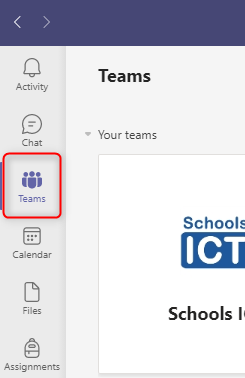
You should now be back at the Teams 'Home' screen, displaying all the Teams that you are a member of. If not, click on the Teams on the left hand app bar (as above) once again.

Click on the 'More Options' cogwheel in the top left corner, and then click on Manage Teams
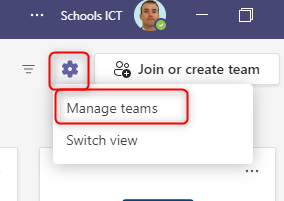
This list of Archived Teams will expand, and any archived Teams that you have access to will be displayed.

Click on the name of the Archived Team that you want to access to open it up.
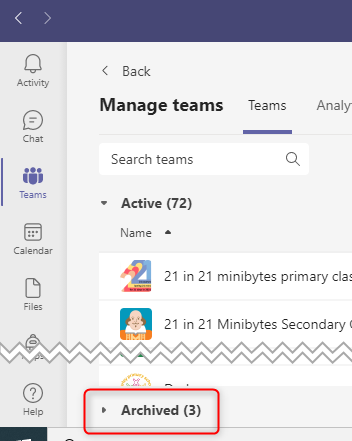
From within Teams, click on Teams on the left hand apps bar.
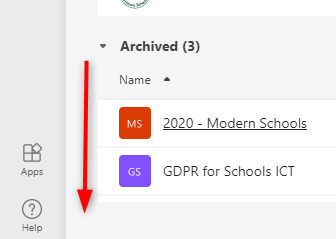
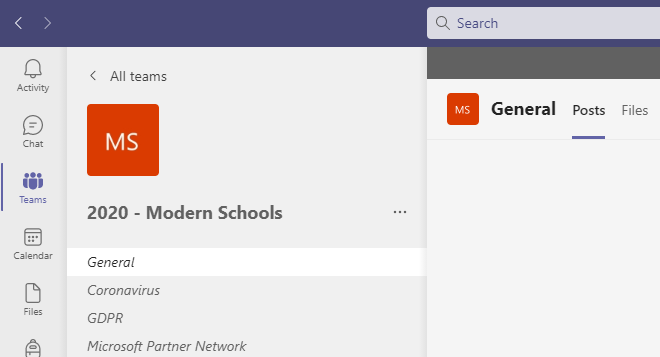
The team will open up and you will be able to access the contents to be able to copy that to an active Team.

N.B. Archived Teams are read-only, so you won't be able to make any changes to the content stored within the team. You'll just be able to read it, or copy it out into a new team.
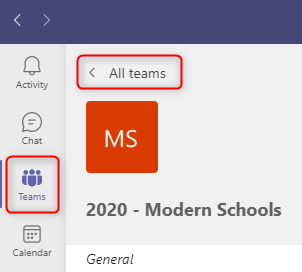
Once you have finished accessing the archived Team, either click on All Teams or Teams to go back to the Teams home screen and access all your current, active Teams.

If you need to get back into the archived Team again, just repeat the above procedure.
You might also be interested in