
• Contact Us
  • 01609 536 086
Nyes Digital Logo

Home

IT Services

3

Sales

3

Web Design

3

School MIS

3

Training

3
Nyes Digital Logo
a

Services

  • 5
    Broadband Services
  • 5
    Cyber Security
  • 5
    Google Services
  • 5
    IT Helpdesk
  • 5
    IT Hardware Repair
  • 5
    Microsoft Services
  • 5
    Mobile Phones and VOIP
  • 5
    Onsite IT Technician
  • 5
    Sales and Installation
  • 5
    WEEE
  • 5
    Vape Detectors

Our Vast Range of Microsoft Services

MIS Services

  • 5
    MIS Overview
  • 5
    MIS Supplier Framework

MIS Systems

  • 5
    Arbor
  • 5
    Bromcom
  • 5
    ESS Sims
  • 5
    Compass

MIS Training

  • 5
    Book Training 

Which MIS Systems do you support?

Website Services

  • 5
    Website Design
  • 5
    Hosting & DNS
  • 5
    Domain Registration
  • 5
    SSL Certification
  • 5
    Brand Design
  • 5
    Meet the Team
  • 5
    Portfolio

What packages do you do?

Training

  • 5
    MIS Training
  • 5
    Cyber Security Training
  • 5
    Microsoft Training

Need Training?

Sales Categories

  • 5
    Sales Home
  • 5
    Accessories
  • 5
    Audio Visual
  • 5
    Computing
  • 5
    Networking
  • 5
    Printers
  • 5
    Software
  • 5
    iPads and Accessories

Need help deciding?

Meetings

by Jack Bowyer | Apr 20, 2022

7

Meetings

Joining a meeting

Starting a Meeting

In the dialog box, press the meet now button
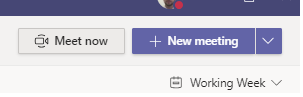
Schedule a meeting with your team or class

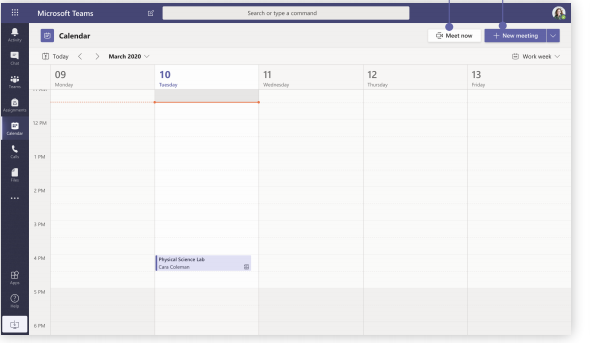
Meet now -  Add participants directly to a meeting that starts right away.

New meeting - Schedule a new meeting for live discussion with up to 250 people or schedule a live event for a broadcasted event with a wider audience.
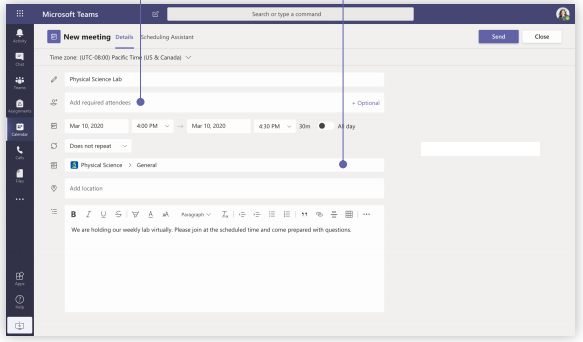
Invite individuals to a meeting - Invite one or more individuals to your meeting. Meeting recordings and resources shared during the meeting will be organized within the meeting history item in you Chat view.

Invite a channel to a meeting - Invite your whole class or working group to a meeting by selecting a channel to host the meeting. Meeting recordings and resources shared during meetings will be organized within the selected channel.
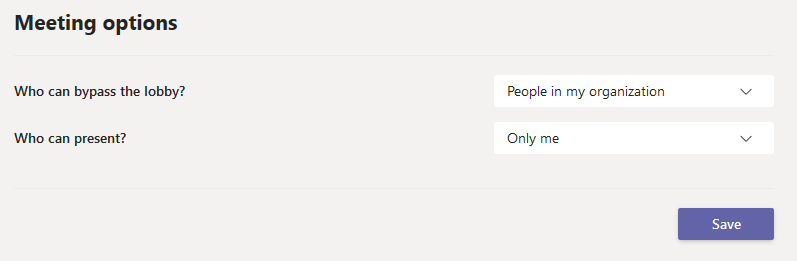
Meeting Options

Once the meeting is scheduled you can go back into the meeting settings to control who can present (ie only the teacher and whether everyone can immediately join the chat or whether they are let in one by one and are held in a lobby first.
You might also be interested in

Ofsted QR Code for Reports

Ofsted QR Code for Reports

In a move to modernize school inspections and increase transparency, Ofsted has officially launched new QR code badges for all education providers across England. The initiative, announced this month by Sir Martyn Oliver, His Majesty’s Chief Inspector, aims to give...

30th January 2026 Suspicious Email Warning

Suspicious Email Warning North Yorkshire Council’s Cyber Security Team have reported to us that numerous members of NYC staff have received an email which appears to be from Embsay School wishing to share admin details via email. We can confirm that this is a spam...

🎉 Cyber Switch Up 2025 Is Here! 🎉

The Yorkshire & Humber Regional Cyber Crime Unit in conjunction with our Partners are once again running the hugely successful Cyber Switch up competition in 2025, and you are warmly invited to get involved! This year’s competition is being sponsored by Amazon Web...